Exporting my Tinderbox Daybook to Org Mode
Every month I export my Tinderbox “Daybook” entries so that I can print and bind them (a whole other story). I have a pretty good Org Mode setup for creating PDFs so I wanted the output to be Org Mode files.
Previously, I used the built-in OPML templates and then converted the output to Org Mode using Pandoc. This was all a bit cumbersome, so I created simple Org Mode export templates, based on the default OPML templates.
Template: Org Mode
#+TITLE: Daybook ^value(attributeEncode($Name))^ 2016
#+DATE:
#+SETUPFILE: ~/Dropbox/org/\_SETUP\_DAYBOOK
#+OPTIONS: toc:nil num:nil >:nil ^:nil <:nil H:2
#+STARTUP: overview

^action($HTMLExportExtension=".org")^

^children(/Templates/Org Mode/Org Mode Item item)^
The front matter sets up my preferred options and LaTeX settings.
Template: Org Mode Item
^if(ChildCount)^\*^indent("\*",^value($OutlineDepth(parent)-1))^ ^value($Name)^ - ^value(format($StartDate,"M0-D w"))^

^value($Text)
^children(/Templates/Org Mode/Org Mode item)^\*^indent("\*",^value($OutlineDepth(parent)-1))^
^else^\*^indent("\*",^value($OutlineDepth(parent)-1))^ ^value($Name)^  - ^value(format($StartDate,"M0-D w"))^

^value($Text)^
^endIf^
This just loops over the notes and outputs org-formatted text.
So, to process my monthly Tinderbox Daybook I do this…
- Select the month in Tinderbox
- Choose “Export Selected Note”
- Open the exported file in Emacs
- Hit “CTRL-x CTRL-e l o” to export a PDF
- Print.
It looks like this:
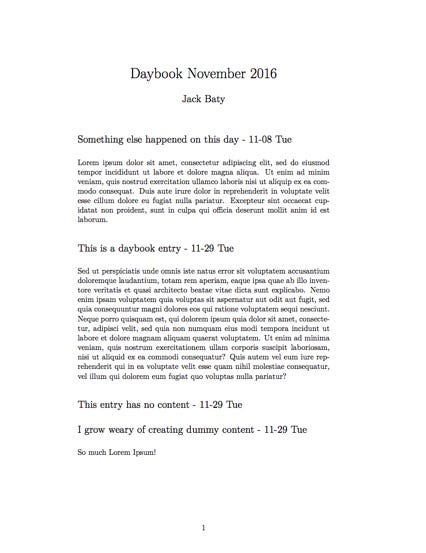
Much better!